

Data centers rely on backup power systems to maintain critical operations when the primary power supply is interrupted. Two commonly used solutions are Battery Backup Units (BBUs) and Uninterruptible Power Supply (UPS) systems. Although both provide battery-backed power, they differ in their installation locations, power architectures, protection coverage, and roles within a data center.
Understanding the differences between BBU vs. UPS helps data center engineers, system integrators, and equipment manufacturers determine how each solution fits into their power infrastructure. This comparison examines their technical differences, whether one can replace the other, and when using both makes sense.
Table of Contents
What Are the Key Differences Between BBU and UPS?
The main difference between a BBU and a UPS lies in where backup power is delivered and which part of the electrical system it supports. A BBU commonly provides localized backup for servers or rack-level power systems, while a UPS supplies battery-backed power to the critical loads connected to its output.
The following table summarizes their typical differences. Actual configurations depend on the data center's power topology, equipment design, and backup requirements.
| Comparison Dimension | Battery Backup Unit (BBU) | Uninterruptible Power Supply (UPS) |
|---|---|---|
| Primary Role | Localized backup for connected servers, racks, or DC power systems. | Backup power for critical loads connected to the UPS output. |
| Typical Installation | Server, power shelf, or rack level. | Electrical room or critical-load power path. |
| Power Architecture | Commonly distributed across individual racks or power systems. | Commonly centralized or modular, depending on facility design. |
| Power Delivery | Often supplies a DC power bus in rack-level applications. | Depends on UPS topology; online double-conversion systems supply AC through an inverter. |
| Conversion Process | Depends on the battery interface and DC power system design. | May involve AC-to-DC rectification and DC-to-AC inversion. |
| Backup Coverage | The connected server, rack, or DC power system. | The connected downstream critical loads. |
| Runtime | Determined by usable battery energy, connected load, and system limits. | Determined by usable battery energy, connected load, and system limits. |
| Redundancy | Can use localized or modular battery redundancy. | Can use N+1, 2N, parallel UPS modules, and redundant distribution paths. |
| Scalability | Can expand through additional battery modules or rack-level systems, subject to system design. | Depends on UPS modularity and available facility infrastructure. |
| Maintenance | Requires monitoring and maintenance across distributed battery locations. | Often supports centralized system monitoring and maintenance. |
Power Architecture and Installation Location
BBUs and UPS systems are typically installed at different points in a data center's power architecture.
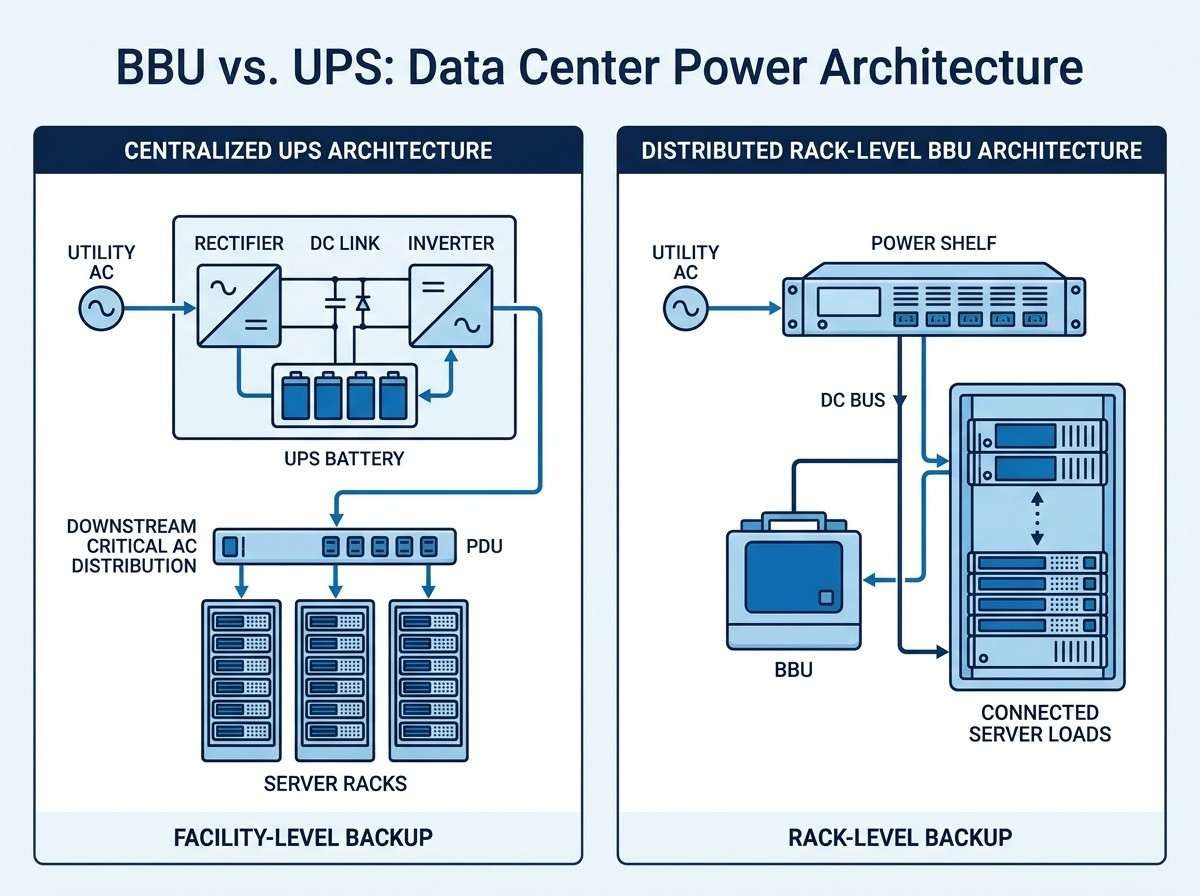
A BBU is commonly deployed close to the equipment it supports, such as within a server, power shelf, or rack-level power system. In many distributed DC architectures, the BBU connects to a DC bus and provides backup power to the associated servers or rack. Some rack designs, including Open Rack architectures, use dedicated battery backup modules as part of the rack power infrastructure.
A UPS is more commonly installed in an electrical room or within a facility-level critical power path. It supplies backup power to the downstream equipment connected to its output. Depending on the design, a UPS may serve multiple racks, a dedicated equipment group, or another defined critical-load segment.
This distinction also affects system architecture. Centralized UPS configurations can simplify the management of backup equipment, but shared components and distribution paths may create common points of failure if they are not adequately protected. Distributed BBUs place backup closer to individual loads, which can support localized fault isolation. However, they also introduce more battery locations and monitoring points.
These are typical arrangements rather than fixed rules. Modular UPS systems and centralized battery configurations exist, while BBU installation locations vary with server and rack design.
Power Delivery and Conversion
Another important difference between BBU and UPS systems is how they deliver power to connected equipment. Their output characteristics depend on the surrounding electrical architecture, so it is inaccurate to define every BBU as a DC device and every UPS as an AC device.
In a typical online double-conversion UPS, incoming AC power passes through a rectifier, which converts it to DC. The DC link supplies the inverter and provides the connection point for the battery system. The inverter then converts DC back to AC for the protected loads. When the utility supply fails, the battery supports the DC link so that the inverter can continue supplying the output.
Other UPS topologies, including line-interactive and standby designs, use different power paths and conversion arrangements. The conversion process therefore needs to be evaluated against the specific UPS topology rather than assumed to be identical across all systems.
In many rack-level BBU applications, the battery connects to a DC power bus or an associated power shelf. When the primary DC supply is interrupted or falls outside its operating range, the BBU supplies energy to the connected DC system. Depending on the design, the power path may include battery charging and discharging circuitry, DC/DC conversion, switching devices, and protection circuits.
The Battery Management System (BMS) is also an important part of a BBU solution. It typically monitors battery parameters such as cell voltage, current, temperature, and state of charge (SOC). It may also provide protection functions, fault reporting, and communication with the wider power management system. The exact functions depend on the battery and system design.
Conversion stages can affect overall system efficiency, but neither architecture is automatically more efficient in every application. The result depends on the number and performance of conversion stages, load profile, operating conditions, and power system design.
Backup Coverage and Runtime
Backup coverage is determined by the electrical path and loads connected to the backup system.
A UPS protects the loads connected to its output and downstream distribution. These may include servers, network equipment, storage systems, or other critical devices, depending on the facility's power design. It does not automatically protect every system in the data center. Cooling equipment, lighting, and other facility loads require their own power and backup arrangements if they must remain operational during an outage.
A BBU generally supports a more localized power domain, such as a server, rack, or DC power system. Its backup coverage does not automatically extend to other racks, facility infrastructure, or unrelated AC loads.
Runtime should not be judged by whether a system is a BBU or a UPS. It depends on usable battery energy, connected load, conversion efficiency, discharge limits, battery condition, and operating temperature. A larger battery capacity does not necessarily translate into longer runtime if the connected load is also higher.
For an accurate runtime estimate, engineers need to evaluate the actual load profile and usable battery energy under the expected operating conditions. Battery discharge limits and the system's power requirements should also be considered.
Redundancy, Scalability, and Maintenance
Redundancy strategies differ because BBUs and UPS systems usually support different parts of the power architecture.
UPS systems may use N+1 or 2N configurations, parallel modules, maintenance bypass arrangements, and redundant power distribution paths. These approaches can improve availability, but the actual level of protection depends on the complete electrical design. Redundant UPS modules alone do not guarantee that downstream distribution is also redundant.
BBU redundancy is more commonly implemented at the battery, power shelf, or rack level. Multiple battery modules or backup paths may help maintain local power availability, depending on how the system is designed. Distributed deployment can limit the impact of certain localized faults, but it also increases the number of components that need to be monitored and maintained.
Monitoring is important for both systems. UPS maintenance typically involves monitoring system status, battery condition, alarms, and bypass operation. BBU maintenance often requires monitoring individual battery modules, including SOC, state of health (SOH), temperature, communication status, and protection events.
Scalability also depends on the original architecture. Modular UPS systems can add capacity through additional modules when the electrical infrastructure supports expansion. Distributed BBU systems may expand by adding battery modules or supported rack-level units, subject to power shelf capacity, bus ratings, controls, and protection coordination.
Can a BBU Replace a UPS?
A BBU can replace some UPS functions in a data center architecture, but it is not a universal substitute for a UPS. Whether a BBU can take over a UPS's role depends on the power distribution design, the type of loads being protected, and the required backup coverage.
In a DC-based rack architecture, a BBU may provide the short-term backup needed to keep connected servers operating when the primary DC supply is interrupted. If the rack power system is designed around this arrangement, a separate UPS may not be required for that specific server power path.
However, replacing a facility-level UPS with rack-level BBUs requires more than adding batteries to individual racks. The system must account for power conversion, distribution, protection coordination, monitoring, fault isolation, and the backup needs of equipment outside the protected DC bus.
For example, a BBU connected to a server rack does not automatically provide backup power for network infrastructure in another distribution domain, cooling equipment, or other AC-powered facility loads. Those loads need to be addressed separately.
A BBU-based architecture may therefore reduce or eliminate the need for a UPS in a defined part of the power system, but it should not be treated as a direct replacement without a complete review of the electrical design and operational requirements.
Do Data Centers Need Both BBU and UPS?
Some data centers use both BBUs and UPS systems because they provide backup at different points in the power architecture. A UPS can support facility-level or equipment-group backup, while BBUs provide additional localized protection for servers or rack-level DC power systems.
In a layered backup design, the two systems may work together to maintain power continuity across different sections of the infrastructure. For example, a simplified power path could include:
- Utility power: Supplies the data center's normal electrical demand.
- UPS system: Supports the critical AC loads connected to its output when utility power is interrupted.
- Power conversion and distribution: Delivers power to the relevant server or rack power systems.
- Rack-level BBU: Provides localized backup to its connected DC power bus or server loads, where the architecture includes this function.
- Generator or other long-duration source: May provide extended backup power, depending on the facility's design and control strategy.
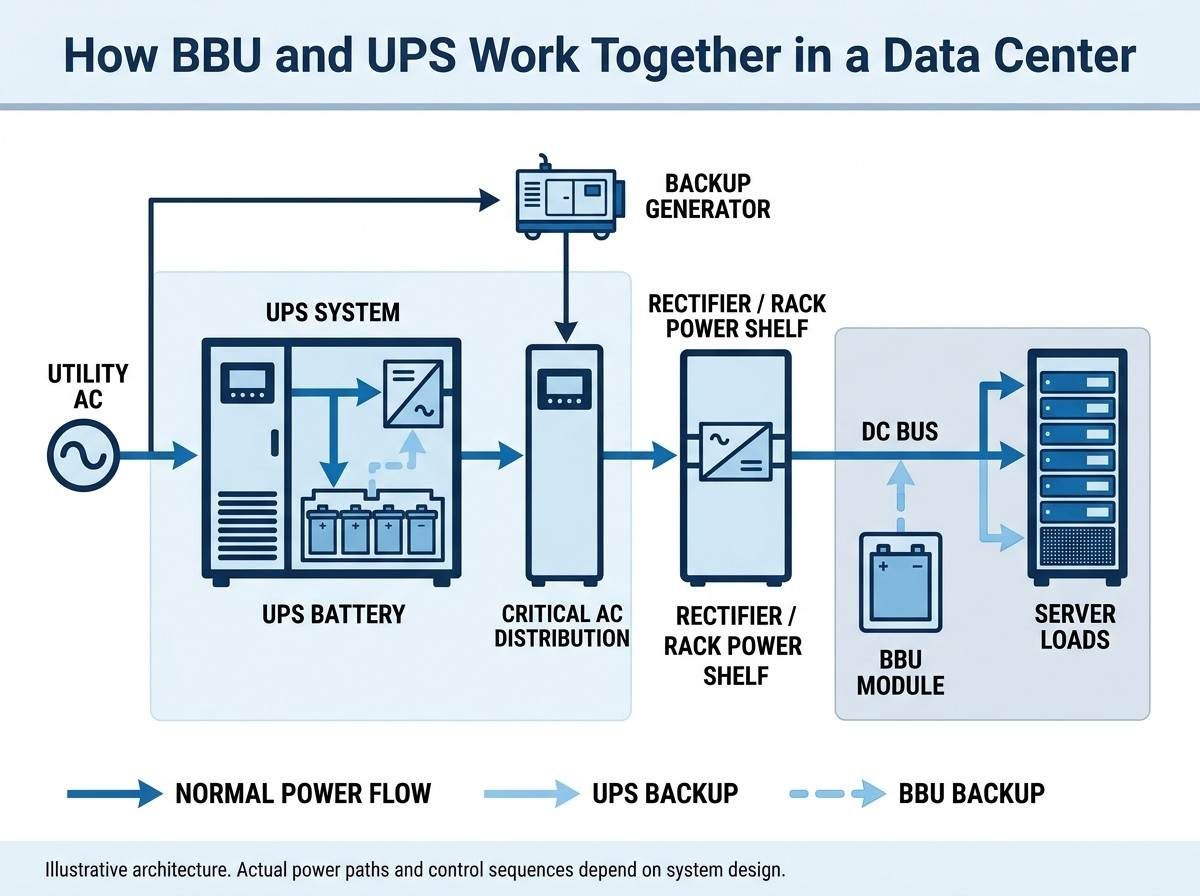
This sequence is illustrative, not a universal operating order. The actual response to a power outage depends on battery connection points, UPS topology, generator integration, transfer controls, and the coordination of the different power systems.
Using both systems can provide layered protection, but it also adds equipment, controls, monitoring requirements, and maintenance work. The decision should be based on the required availability level, load distribution, backup duration, and total infrastructure cost rather than assuming every data center needs both.
BBU vs. UPS: Which Is Right for Your Data Center?
Choosing between a BBU and a UPS starts with identifying which loads need backup and where backup power should enter the electrical architecture. The following scenarios illustrate how different data center designs may approach this decision.
Traditional AC-Powered Data Centers
Traditional data centers commonly use UPS systems to support critical AC distribution. A centralized or modular UPS can supply backup power to multiple downstream loads, making it suitable when the facility is designed around AC power distribution.
BBUs may still be used for localized server or rack-level backup where additional protection is required. The choice depends on whether the existing UPS architecture provides sufficient coverage and whether individual equipment requires a separate backup layer.
High-Density Server and AI Data Center Racks
High-density server and AI workloads place significant demands on rack-level power delivery. In these environments, localized BBU solutions may help support DC power architectures and provide backup close to high-power server loads.
Engineers should evaluate rack power requirements, peak and transient loads, battery discharge capability, thermal conditions, and available space. Facility-level UPS protection may still be needed for other critical AC loads and upstream power infrastructure.
Distributed DC Power Architectures
Data centers using distributed DC power architectures may favor BBUs because backup can be integrated closer to individual racks or power distribution points. This approach can support modular deployment and localized backup, provided that battery interfaces, DC bus ratings, protection, and monitoring are properly coordinated.
A UPS may still be required for AC-powered equipment or other loads outside the DC architecture. The decision should therefore be based on the complete power distribution design rather than the use of DC power alone.
What Should OEMs Consider When Integrating a BBU into a Data Center Power System?
For server, power supply, and data center equipment OEMs, BBU integration requires more than selecting a battery with sufficient nominal capacity. The battery must operate reliably within the electrical, mechanical, thermal, and control architecture of the target system.
- Power and capacity requirements: Define the continuous and peak load, required backup duration, discharge rate, usable energy, and expected operating profile.
- Electrical compatibility: Verify nominal voltage, operating voltage range, current limits, DC bus compatibility, charging requirements, connectors, and protection coordination.
- BMS and communication: Confirm monitoring requirements, protection logic, alarm handling, communication protocols, and integration with the system controller.
- Thermal and mechanical design: Evaluate operating temperature, heat dissipation, installation space, vibration, mounting, and service access.
- Safety and certification: Identify the standards and certification requirements applicable to the intended battery, module, or system configuration. Confirm that certification scope matches the actual product level and application.
These requirements should be defined early in the development process so that the battery design, power electronics, enclosure, and system controls can be validated together.
ACE Battery provides battery solutions for backup power and data center-related applications. OEMs evaluating a BBU project can review the BBU Series Ener Core 5.5 and discuss application-specific electrical and integration requirements with the engineering team.
Exploring a Custom BBU Battery Solution?
Discuss your power requirements, battery configuration, and integration needs with ACE Battery.
Contact ACE BatteryConclusion
BBU and UPS systems both support data center power continuity, but they serve different roles. A UPS commonly protects connected critical loads through a facility-level or equipment-group power path, while a BBU typically provides localized backup for servers, racks, or DC power systems. Their runtime, redundancy, and scalability depend on the specific electrical architecture and system design.
The right solution depends on the loads being protected, the power distribution topology, backup duration, and availability requirements. Some data centers can use BBUs for defined DC power domains, while others benefit from combining rack-level BBUs with facility-level UPS protection. For more background, see what a Battery Backup Unit is and how it works, or visit the ACE Battery website to explore its battery solutions.